How OpenShell Works — NVIDIA OpenShell Developer Guide
How OpenShell Works #
OpenShell runs inside a Docker container. Each sandbox is an isolated environment managed through the gateway. Four components work together to keep agents secure.
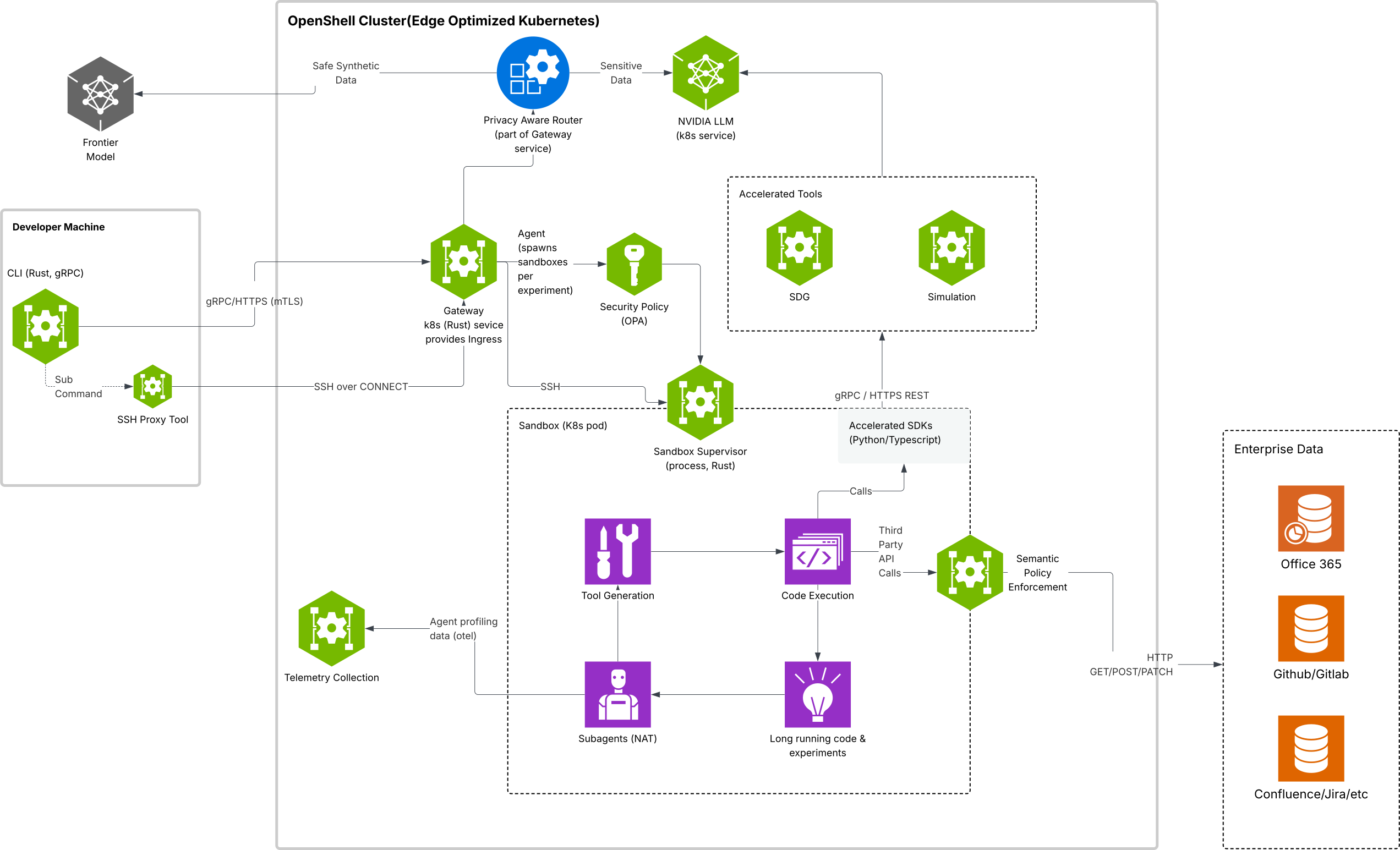
Components #
The following table describes each component and its role in the system:
| Component | Role |
|---|---|
| Gateway | Control-plane API that coordinates sandbox lifecycle and state, acts as the auth boundary, and brokers requests across the platform. |
| Sandbox | Isolated runtime that includes container supervision and policy-enforced egress routing. |
| Policy Engine | Policy definition and enforcement layer for filesystem, network, and process constraints. Defense in depth enforces policies from the application layer down to infrastructure and kernel layers. |
| Privacy Router | Privacy-aware LLM routing layer that keeps sensitive context on sandbox compute and routes based on cost and privacy policy. |
How a Request Flows #
Every outbound connection from agent code passes through the same decision path:
-
The agent process opens an outbound connection (API call, package install, git clone, and so on).
-
The proxy inside the sandbox intercepts the connection and identifies which binary opened it.
-
If the target is
https://inference.local, the proxy handles it as managed inference before policy evaluation. OpenShell strips sandbox-supplied credentials, injects the configured backend credentials, and forwards the request to the managed model endpoint. -
For every other destination, the proxy queries the policy engine with the destination, port, and calling binary.
-
The policy engine returns one of two decisions:
-
Allow - the destination and binary match a policy block. Traffic flows directly to the external service.
-
Deny - no policy block matched. The connection is blocked and logged.
-
For REST endpoints with TLS termination enabled, the proxy also decrypts TLS and checks each HTTP request against per-method, per-path rules before allowing it through.
Deployment Modes #
OpenShell can run locally, on a remote host, or behind a cloud proxy. The architecture is identical in all cases — only the Docker container location and authentication mode change.
| Mode | Description | Command |
|---|---|---|
| Local | The gateway runs inside Docker on your workstation. The CLI provisions it automatically on first use. | openshell gateway start |
| Remote | The gateway runs on a remote host via SSH. Only Docker is required on the remote machine. | openshell gateway start --remote user@host |
| Cloud | A gateway already running behind a reverse proxy (e.g. Cloudflare Access). Register and authenticate via browser. | openshell gateway add https://gateway.example.com |
You can register multiple gateways and switch between them with openshell gateway select. For the full deployment and management workflow, refer to the Gateways section.
Next Steps #
Continue with one of the following:
-
To deploy or register a gateway, refer to Gateways.
-
To create your first sandbox, refer to the Quickstart.
-
To learn how OpenShell enforces isolation across all protection layers, refer to Sandboxes.